
Invoice Rows Split Across Pages: Before and After, Compared on Real Printouts (break-inside and background-off CSS)
When an invoice or delivery note printed from an online shop or admin screen runs onto a second page, a line item can split in half. This block puts the same HTML side by side before and after the fix, as actually printed. The 32 line items are div-based grid rows, as admin screens often build them, with the product name and its specification on two lines. Before the fix, row 15 leaves only its name at the bottom of page 1 while the specification, quantity, unit price, amount and bottom rule move to the top of page 2, and the shaded header and zebra stripes disappear in print. After the fix, each row gets break-inside: avoid and the header and stripes are replaced with rules and bold type, so the whole row moves to page 2. Each state shows the full A4 pages in miniature and a 2x band at the page break, alongside the two CSS changes, two checks for clients before accepting the work (no split rows, readable with background graphics off), a button that prints the selected state with its own CSS, and a shareable image stacking the before and after bands. The page images were printed with a pinned Chromium build on A4 at 100% scale, 10 mm margins and background graphics off, and before the images are made, a check on the text positions in the PDF confirms that only the before state splits. Amounts use tabular figures aligned right, and consumption tax is rounded down once per tax rate. All invoice details are fictional.
Preview
BLK-112
請求書の明細行が改ページで分かれる問題|修正前と修正後を実際の印刷で比べる
明細32行の同じ請求書を、CSSだけ変えて印刷した紙面です。1枚目の最後と2枚目の最初、改ページの前後を見比べてください。
- 印刷
- Chromium 156.0.8078.4(固定版)
- 用紙
- A4 縦
- 倍率
- 100%
- 余白
- 10mm
- 背景のグラフィック
- オフ
- フォント
- Noto Sans CJK JP
15行目が改ページで分かれて、品名だけが1枚目に、仕様と金額は2枚目に分かれる
15行目「アーモンドプードル 1kg」の品名だけが1枚目の最後に残り、仕様・数量・単価・金額と下罫は2枚目の先頭へ送られました。背景色の見出しは色が抜けて薄い灰色の文字だけになり、縞も消えて行の区切りは薄い罫だけです。2枚目の先頭の数字がどの品名のものか、紙だけでは追えません。
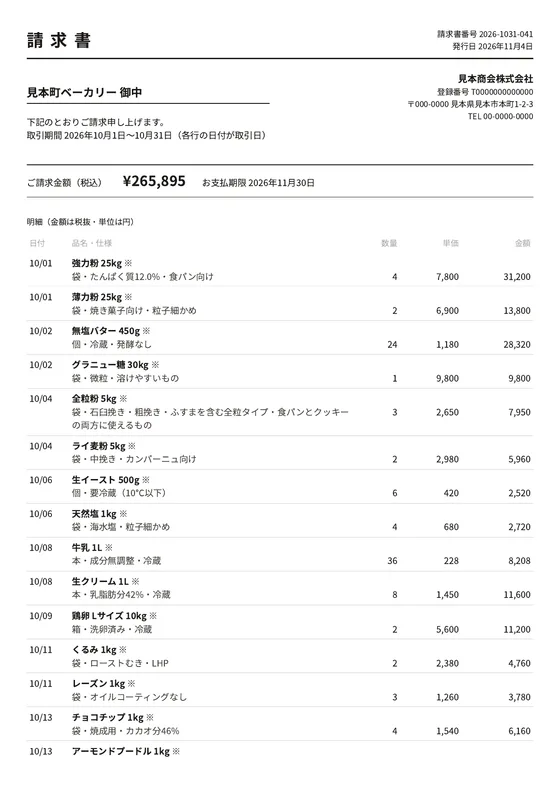
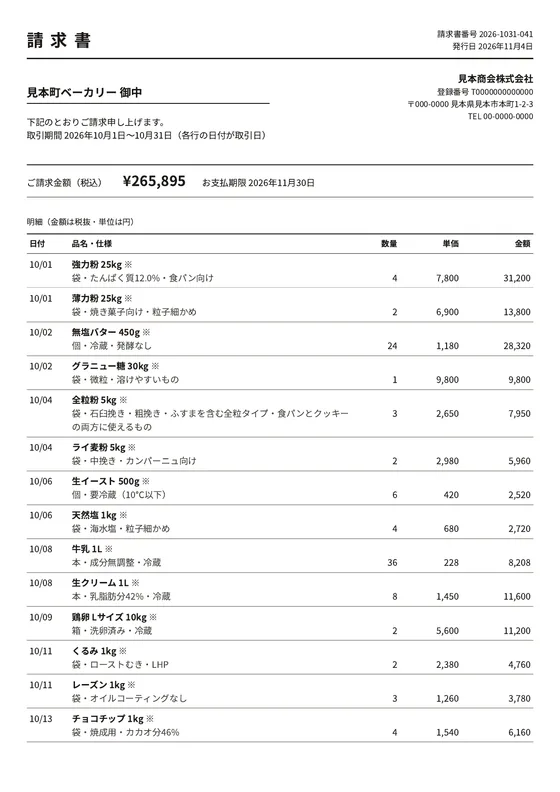
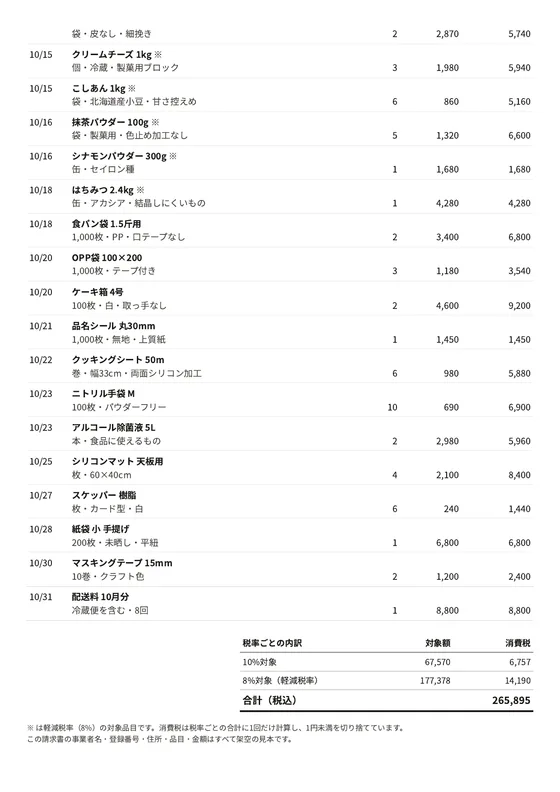
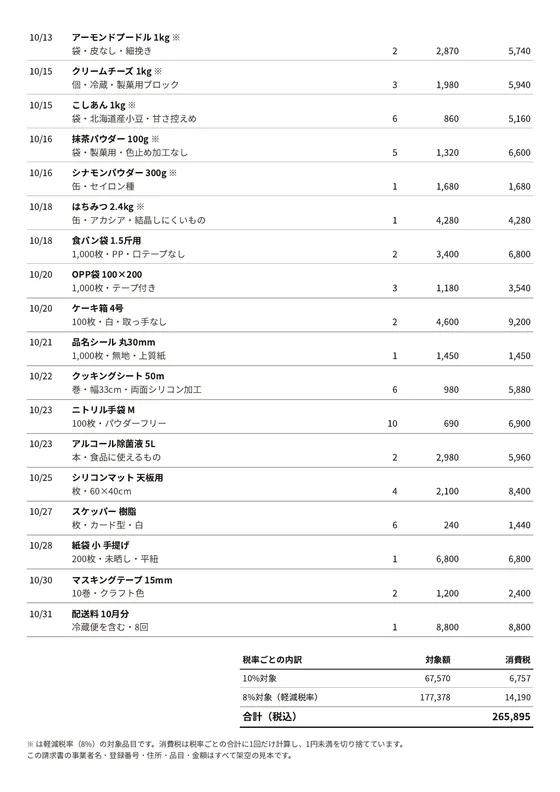
改ページの位置(2倍に拡大)


ここから2ページ目


画像は下の「この状態で印刷」と同じHTMLを、上の条件でPDFに印刷してから画像にしたものです。お使いのブラウザやフォントでは、改ページの位置が数行ずれることがあります。
追加したCSS(2か所)
1 見出しの行
.inv-head {削除: background: #57534e;削除: color: #fff;}追加: border-top: 1pt solid #1c1917;追加: border-bottom: 1pt solid #1c1917;追加: font-weight: 700;
2 明細の行
.inv-row {削除: border-bottom: 0.5pt solid #e7e5e4;}削除: .inv-row:nth-child(even) {削除: background: #f5f5f4;}追加: border-bottom: 0.5pt solid #a8a29e;追加: break-inside: avoid;
発注者が納品前に確認したい2点
- 1
明細行がページをまたいで分かれていないか
1枚目の最後の行と2枚目の最初の行を見ます。品名だけの行・金額だけの行があれば、改ページで分かれています。明細が1枚に収まる見本では見つからないので、2枚以上になる件数で印刷してもらいます。
- 2
背景色を印刷しなくても読めるか
印刷の設定で「背景のグラフィック」をオフにして見ます(多くのブラウザの既定)。見出しの文字が消えたり薄くなったりしていないか、縞が無くても行と列を指でたどれるかを確かめます。
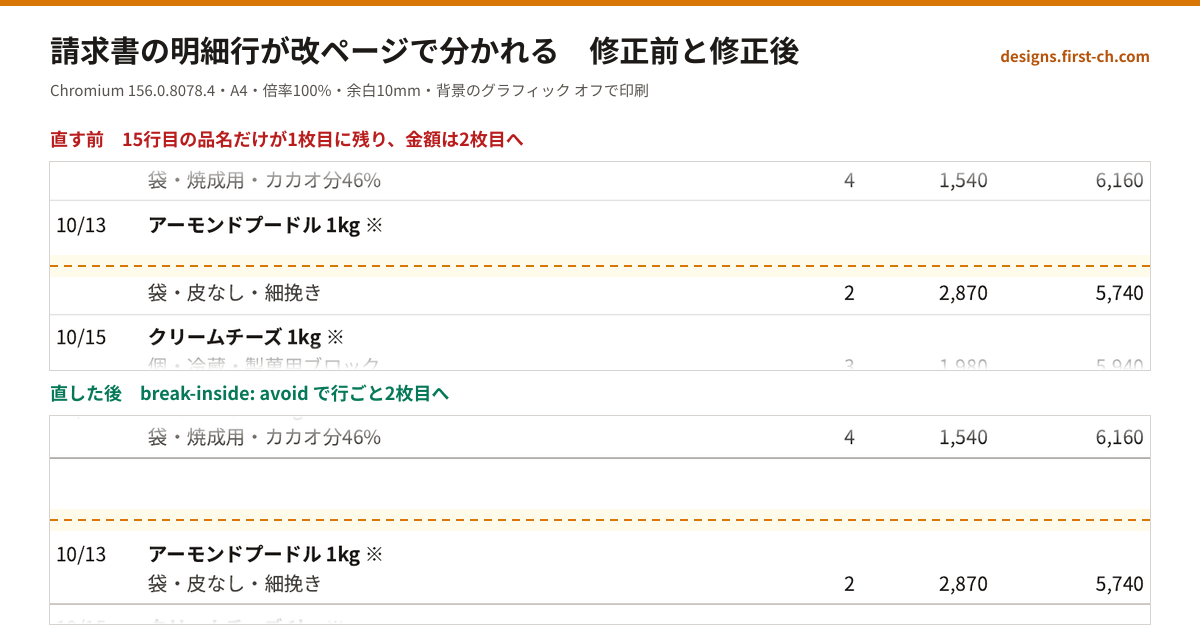
印刷の画面で「背景のグラフィック」をオフ、余白を既定のままにすると、上の紙面と同じ条件になります。
この見本で扱わないこと: 合計欄の改ページ、2枚目への見出しの繰り返し、PDFの生成、税務の判断。
根拠にした資料
紙面には適格請求書の記載事項を架空の値で載せています。
- 国税庁「適格請求書等保存方式の概要」紙面の記載事項(登録番号・税率ごとの対象額と消費税額など)
- MDN「break-inside」行の途中で紙を替えない指定
- MDN「print-color-adjust」印刷で背景色が省かれる仕組み
Read the full description
When an invoice or delivery note printed from an online shop or admin screen runs onto a second page, a line item can split in half. This block puts the same HTML side by side before and after the fix, as actually printed. The 32 line items are div-based grid rows, as admin screens often build them, with the product name and its specification on two lines. Before the fix, row 15 leaves only its name at the bottom of page 1 while the specification, quantity, unit price, amount and bottom rule move to the top of page 2, and the shaded header and zebra stripes disappear in print. After the fix, each row gets break-inside: avoid and the header and stripes are replaced with rules and bold type, so the whole row moves to page 2. Each state shows the full A4 pages in miniature and a 2x band at the page break, alongside the two CSS changes, two checks for clients before accepting the work (no split rows, readable with background graphics off), a button that prints the selected state with its own CSS, and a shareable image stacking the before and after bands. The page images were printed with a pinned Chromium build on A4 at 100% scale, 10 mm margins and background graphics off, and before the images are made, a check on the text positions in the PDF confirms that only the before state splits. Amounts use tabular figures aligned right, and consumption tax is rounded down once per tax rate. All invoice details are fictional.
- Added:
- 2026-11-08
- Updated:
- 2026-11-09
- Dependencies:
- None
- tags
- #layout #print #invoice #page-break #break-inside #print-css #table #admin #before-after #japanese #no-dependency
"use client";
import { useEffect, useRef, useState, type KeyboardEvent } from "react";
/**
* 請求書の改ページ 直す前/直した後(同じHTMLを固定版の Chromium で印刷した紙面で比べる)
*
* 差別化: 既存の印刷を扱うブロック(hanko-approval-stamp)は画面と印刷で表示を切り替えるだけで、紙の境界は扱わない。
* 本ブロックは「明細の行が2枚目へ割れる」「背景色が消えて列が追えない」を、実際に印刷した紙面の画像で直す前・後に並べ、
* 足すCSS 2か所と発注者の確認2点までを1画面にまとめた読み比べ型。英字の小見出し・見出しの「。」止め・末尾の矢印リンク・角丸・出現アニメは使わない。
*
* 汎用技法メモ:
* 1. **2行の明細は grid の2段で組むと、段の間で紙が替わる**。品名を1段目、仕様・数量・金額を2段目に置いた行は、
* Chromium の改ページで1段目だけが前の紙に残る。行の要素に break-inside: avoid を足すと、行ごと次の紙へ送られる。
* 2. **印刷の既定は「背景のグラフィック オフ」**。背景色で作った見出し(白文字)と縞は紙では消える。
* 見出しは上下の罫線と太字、行の区切りは下罫で表すと、背景を切っても列が追える。
* 3. **「この状態で印刷」は隠した iframe の srcdoc に同じHTMLを入れて contentWindow.print()**。
* ページ全体の @media print を書き換えずに、選んだ状態の請求書だけを印刷できる。
* 4. 消費税は税率ごとの合計に1回だけ掛け、1円未満を切り捨てる(行ごとに丸めない)。
*
* 事業者名・登録番号・品目・金額はすべて架空の見本。
*/
/* ───────── 紙面の条件(画像を作ったときの値) ───────── */
export const PRINT_ENV = {
browser: "Chromium 156.0.8078.4",
paper: "A4 縦",
scale: "100%",
margin: "10mm",
background: "オフ",
font: "Noto Sans CJK JP",
};
/** 直す前に2枚目へ割れる明細の行(1始まり)。画像を作るときの検査と一致させる */
export const SPLIT_ROW = 15;
/* ───────── 明細(架空) ───────── */
export type Rate = 8 | 10;
export type Line = { date: string; name: string; spec: string; qty: number; unit: number; rate: Rate };
export const LINES: Line[] = [
{ date: "10/01", name: "強力粉 25kg", spec: "袋・たんぱく質12.0%・食パン向け", qty: 4, unit: 7800, rate: 8 },
{ date: "10/01", name: "薄力粉 25kg", spec: "袋・焼き菓子向け・粒子細かめ", qty: 2, unit: 6900, rate: 8 },
{ date: "10/02", name: "無塩バター 450g", spec: "個・冷蔵・発酵なし", qty: 24, unit: 1180, rate: 8 },
{ date: "10/02", name: "グラニュー糖 30kg", spec: "袋・微粒・溶けやすいもの", qty: 1, unit: 9800, rate: 8 },
{ date: "10/04", name: "全粒粉 5kg", spec: "袋・石臼挽き・粗挽き・ふすまを含む全粒タイプ・食パンとクッキーの両方に使えるもの", qty: 3, unit: 2650, rate: 8 },
{ date: "10/04", name: "ライ麦粉 5kg", spec: "袋・中挽き・カンパーニュ向け", qty: 2, unit: 2980, rate: 8 },
{ date: "10/06", name: "生イースト 500g", spec: "個・要冷蔵(10℃以下)", qty: 6, unit: 420, rate: 8 },
{ date: "10/06", name: "天然塩 1kg", spec: "袋・海水塩・粒子細かめ", qty: 4, unit: 680, rate: 8 },
{ date: "10/08", name: "牛乳 1L", spec: "本・成分無調整・冷蔵", qty: 36, unit: 228, rate: 8 },
{ date: "10/08", name: "生クリーム 1L", spec: "本・乳脂肪分42%・冷蔵", qty: 8, unit: 1450, rate: 8 },
{ date: "10/09", name: "鶏卵 Lサイズ 10kg", spec: "箱・洗卵済み・冷蔵", qty: 2, unit: 5600, rate: 8 },
{ date: "10/11", name: "くるみ 1kg", spec: "袋・ローストむき・LHP", qty: 2, unit: 2380, rate: 8 },
{ date: "10/11", name: "レーズン 1kg", spec: "袋・オイルコーティングなし", qty: 3, unit: 1260, rate: 8 },
{ date: "10/13", name: "チョコチップ 1kg", spec: "袋・焼成用・カカオ分46%", qty: 4, unit: 1540, rate: 8 },
{ date: "10/13", name: "アーモンドプードル 1kg", spec: "袋・皮なし・細挽き", qty: 2, unit: 2870, rate: 8 },
{ date: "10/15", name: "クリームチーズ 1kg", spec: "個・冷蔵・製菓用ブロック", qty: 3, unit: 1980, rate: 8 },
{ date: "10/15", name: "こしあん 1kg", spec: "袋・北海道産小豆・甘さ控えめ", qty: 6, unit: 860, rate: 8 },
{ date: "10/16", name: "抹茶パウダー 100g", spec: "袋・製菓用・色止め加工なし", qty: 5, unit: 1320, rate: 8 },
{ date: "10/16", name: "シナモンパウダー 300g", spec: "缶・セイロン種", qty: 1, unit: 1680, rate: 8 },
{ date: "10/18", name: "はちみつ 2.4kg", spec: "缶・アカシア・結晶しにくいもの", qty: 1, unit: 4280, rate: 8 },
{ date: "10/18", name: "食パン袋 1.5斤用", spec: "1,000枚・PP・口テープなし", qty: 2, unit: 3400, rate: 10 },
{ date: "10/20", name: "OPP袋 100×200", spec: "1,000枚・テープ付き", qty: 3, unit: 1180, rate: 10 },
{ date: "10/20", name: "ケーキ箱 4号", spec: "100枚・白・取っ手なし", qty: 2, unit: 4600, rate: 10 },
{ date: "10/21", name: "品名シール 丸30mm", spec: "1,000枚・無地・上質紙", qty: 1, unit: 1450, rate: 10 },
{ date: "10/22", name: "クッキングシート 50m", spec: "巻・幅33cm・両面シリコン加工", qty: 6, unit: 980, rate: 10 },
{ date: "10/23", name: "ニトリル手袋 M", spec: "100枚・パウダーフリー", qty: 10, unit: 690, rate: 10 },
{ date: "10/23", name: "アルコール除菌液 5L", spec: "本・食品に使えるもの", qty: 2, unit: 2980, rate: 10 },
{ date: "10/25", name: "シリコンマット 天板用", spec: "枚・60×40cm", qty: 4, unit: 2100, rate: 10 },
{ date: "10/27", name: "スケッパー 樹脂", spec: "枚・カード型・白", qty: 6, unit: 240, rate: 10 },
{ date: "10/28", name: "紙袋 小 手提げ", spec: "200枚・未晒し・平紐", qty: 1, unit: 6800, rate: 10 },
{ date: "10/30", name: "マスキングテープ 15mm", spec: "10巻・クラフト色", qty: 2, unit: 1200, rate: 10 },
{ date: "10/31", name: "配送料 10月分", spec: "冷蔵便を含む・8回", qty: 1, unit: 8800, rate: 10 },
];
/** 税率ごとに合計し、消費税はその合計に1回だけ掛けて1円未満を切り捨てる */
export function computeTotals(lines: Line[]) {
const by = (r: Rate) => lines.filter((l) => l.rate === r).reduce((s, l) => s + l.qty * l.unit, 0);
const base10 = by(10);
const base8 = by(8);
const tax10 = Math.floor((base10 * 10) / 100);
const tax8 = Math.floor((base8 * 8) / 100);
return { base10, base8, tax10, tax8, total: base10 + base8 + tax10 + tax8 };
}
/* ───────── 紙面のCSS(直す前と後で違うのは2か所だけ) ───────── */
export type State = "before" | "after";
const COLS = "grid-template-columns: 13mm minmax(0, 1fr) 13mm 20mm 24mm; column-gap: 3mm;";
export const CSS_BASE = `@page { size: A4; margin: 10mm; }
* { box-sizing: border-box; }
html { -webkit-text-size-adjust: 100%; }
body { margin: 0; font-family: "Noto Sans JP", "Noto Sans CJK JP", "Hiragino Sans", "Yu Gothic", sans-serif; font-size: 9.5pt; line-height: 1.5; color: #1c1917; background: #fff; }
.paper { width: 190mm; }
h1 { margin: 0; font-size: 18pt; letter-spacing: 0.4em; }
.top { display: flex; justify-content: space-between; align-items: flex-end; border-bottom: 1.5pt solid #1c1917; padding-bottom: 2mm; }
.meta { text-align: right; font-size: 8.5pt; }
.parties { display: grid; grid-template-columns: 1fr 1fr; gap: 8mm; margin-top: 5mm; }
.to { font-size: 12pt; font-weight: 700; border-bottom: 0.5pt solid #1c1917; padding-bottom: 1mm; }
.from { font-size: 8.5pt; text-align: right; }
.from b { font-size: 10pt; }
.due { display: flex; gap: 6mm; align-items: baseline; margin-top: 5mm; padding: 2mm 0; border-top: 0.5pt solid #1c1917; border-bottom: 0.5pt solid #1c1917; }
.due .v { font-size: 15pt; font-weight: 700; font-variant-numeric: tabular-nums; }
.lead { margin: 7mm 0 2mm; font-size: 8.5pt; }
.inv-head, .inv-row { display: grid; ${COLS} }
.inv-head { padding: 1.4mm 1mm; font-size: 8.5pt; }
.inv-row { grid-template-rows: auto auto; padding: 1.2mm 1mm; }
.inv-row p { margin: 0; }
.date { grid-row: 1; grid-column: 1; font-variant-numeric: tabular-nums; }
.name { grid-row: 1; grid-column: 2 / 6; font-weight: 700; }
.spec { grid-row: 2; grid-column: 2; color: #44403c; }
.num { grid-row: 2; text-align: right; font-variant-numeric: tabular-nums; }
.qty { grid-column: 3; } .unit { grid-column: 4; } .amt { grid-column: 5; }
.r { text-align: right; }
.sum { display: grid; grid-template-columns: 1fr 34mm 30mm; margin: 5mm 0 0 auto; width: 110mm; font-size: 9pt; }
.sum div { padding: 1mm; border-bottom: 0.5pt solid #a8a29e; font-variant-numeric: tabular-nums; }
.sum .h { font-weight: 700; border-bottom: 1pt solid #1c1917; }
.sum .t { font-weight: 700; font-size: 10.5pt; border-bottom: 1.5pt solid #1c1917; }
.note { margin-top: 4mm; font-size: 8pt; color: #44403c; }
`;
export const CSS_DIFF: { label: string; before: string; after: string }[] = [
{
label: "見出しの行",
before: `.inv-head {
background: #57534e;
color: #fff;
}`,
after: `.inv-head {
border-top: 1pt solid #1c1917;
border-bottom: 1pt solid #1c1917;
font-weight: 700;
}`,
},
{
label: "明細の行",
before: `.inv-row {
border-bottom: 0.5pt solid #e7e5e4;
}
.inv-row:nth-child(even) {
background: #f5f5f4;
}`,
after: `.inv-row {
border-bottom: 0.5pt solid #a8a29e;
break-inside: avoid;
}`,
},
];
const yen = (n: number) => n.toLocaleString("ja-JP");
const esc = (s: string) => s.replace(/&/g, "&").replace(/</g, "<").replace(/>/g, ">");
/** 画像に印刷したのと同じ請求書のHTML。extraHead は画像を作るときだけフォントの指定を足すのに使う */
export function invoiceHtml(state: State, extraHead = "") {
const t = computeTotals(LINES);
const css = CSS_BASE + CSS_DIFF.map((d) => d[state]).join("\n");
const rows = LINES.map(
(l, i) => `<div class="inv-row" data-row="${i + 1}">
<p class="date">${l.date}</p><p class="name">${esc(l.name)}${l.rate === 8 ? " ※" : ""}</p>
<p class="spec">${esc(l.spec)}</p><p class="num qty">${l.qty}</p><p class="num unit">${yen(l.unit)}</p><p class="num amt">${yen(l.qty * l.unit)}</p>
</div>`,
).join("\n");
return `<!doctype html>
<html lang="ja"><head><meta charset="utf-8"><title>請求書(見本)</title>
<style>
${css}
</style>${extraHead}</head>
<body><main class="paper">
<div class="top"><h1>請求書</h1><div class="meta">請求書番号 2026-1031-041<br>発行日 2026年11月4日</div></div>
<div class="parties">
<div><p class="to">見本町ベーカリー 御中</p><p>下記のとおりご請求申し上げます。<br>取引期間 2026年10月1日〜10月31日(各行の日付が取引日)</p></div>
<div class="from"><b>見本商会株式会社</b><br>登録番号 T0000000000000<br>〒000-0000 見本県見本市本町1-2-3<br>TEL 00-0000-0000</div>
</div>
<div class="due"><span>ご請求金額(税込)</span><span class="v">¥${yen(t.total)}</span><span>お支払期限 2026年11月30日</span></div>
<p class="lead">明細(金額は税抜・単位は円)</p>
<div class="inv-head"><span>日付</span><span>品名・仕様</span><span class="r">数量</span><span class="r">単価</span><span class="r">金額</span></div>
<div class="inv-body">
${rows}
</div>
<div class="sum">
<div class="h">税率ごとの内訳</div><div class="h r">対象額</div><div class="h r">消費税</div>
<div>10%対象</div><div class="r">${yen(t.base10)}</div><div class="r">${yen(t.tax10)}</div>
<div>8%対象(軽減税率)</div><div class="r">${yen(t.base8)}</div><div class="r">${yen(t.tax8)}</div>
<div class="t">合計(税込)</div><div class="t r"></div><div class="t r">${yen(t.total)}</div>
</div>
<p class="note">※ は軽減税率(8%)の対象品目です。消費税は税率ごとの合計に1回だけ計算し、1円未満を切り捨てています。<br>この請求書の事業者名・登録番号・住所・品目・金額はすべて架空の見本です。</p>
</main></body></html>`;
}
/* ───────── 画面 ───────── */
const IMG = "/designs/invoice-print-layout";
const STATES: { id: State; label: string; note: string }[] = [
{ id: "before", label: "直す前", note: "見出しに背景色、行に縞模様。改ページの指定なし" },
{ id: "after", label: "直した後", note: "罫線と太字・行に break-inside: avoid" },
];
export const RESULT: Record<State, { head: string; body: string }> = {
before: {
head: `${SPLIT_ROW}行目が改ページで分かれて、品名だけが1枚目に、仕様と金額は2枚目に分かれる`,
body: `${SPLIT_ROW}行目「${LINES[SPLIT_ROW - 1].name}」の品名だけが1枚目の最後に残り、仕様・数量・単価・金額と下罫は2枚目の先頭へ送られました。背景色の見出しは色が抜けて薄い灰色の文字だけになり、縞も消えて行の区切りは薄い罫だけです。2枚目の先頭の数字がどの品名のものか、紙だけでは追えません。`,
},
after: {
head: `${SPLIT_ROW}行目がまるごと2枚目へ移る`,
body: `${SPLIT_ROW}行目は品名から金額・下罫までまとめて2枚目の先頭へ移り、1枚目の最後には余白が残ります。見出しは上下の罫線と太字になり、背景色を印刷しない紙でも列の区切りが読めます。`,
},
};
const CHECKS = [
{
title: "明細行がページをまたいで分かれていないか",
body: "1枚目の最後の行と2枚目の最初の行を見ます。品名だけの行・金額だけの行があれば、改ページで分かれています。明細が1枚に収まる見本では見つからないので、2枚以上になる件数で印刷してもらいます。",
},
{
title: "背景色を印刷しなくても読めるか",
body: "印刷の設定で「背景のグラフィック」をオフにして見ます(多くのブラウザの既定)。見出しの文字が消えたり薄くなったりしていないか、縞が無くても行と列を指でたどれるかを確かめます。",
},
];
const SOURCES = [
{ href: "https://www.nta.go.jp/taxes/shiraberu/zeimokubetsu/shohi/keigenzeiritsu/invoice_about.htm", name: "国税庁「適格請求書等保存方式の概要」", note: "紙面の記載事項(登録番号・税率ごとの対象額と消費税額など)" },
{ href: "https://developer.mozilla.org/ja/docs/Web/CSS/break-inside", name: "MDN「break-inside」", note: "行の途中で紙を替えない指定" },
{ href: "https://developer.mozilla.org/ja/docs/Web/CSS/print-color-adjust", name: "MDN「print-color-adjust」", note: "印刷で背景色が省かれる仕組み" },
];
const RELATED = [
{ slug: "sortable-spec-table", code: "BLK-99", name: "並べ替えと絞り込みができる仕様比較表", note: "件数の多い表を画面で読む" },
{ slug: "pricing-compare-table", code: "BLK-33", name: "料金の機能比較マトリクス", note: "列を見比べる表の基本形" },
{ slug: "hanko-approval-stamp", code: "BLK-110", name: "印刷すると押印欄に切り替わる承認ステッパー", note: "印刷すると押印欄に切り替わる" },
];
const CONTACT_URL = "https://first-ch.com/?utm_source=designs&utm_medium=referral&utm_campaign=invoice-print-layout#contact";
const focusRing = "outline-none focus-visible:ring-2 focus-visible:ring-[#d97706] focus-visible:ring-offset-2";
function Page({ state, page }: { state: State; page: 1 | 2 }) {
return (
<figure className="min-w-0">
<div className="relative aspect-[210/297] border border-stone-300 bg-white shadow-[0_1px_2px_rgba(28,25,23,0.08)]">
{STATES.map((s) => (
// eslint-disable-next-line @next/next/no-img-element
<img
key={s.id}
src={`${IMG}-${s.id}-p${page}.webp`}
alt={s.id === state ? `${s.label}の${page}枚目(A4・縮小)` : ""}
aria-hidden={s.id !== state}
width={560}
height={792}
className={`absolute inset-0 h-full w-full transition-opacity duration-150 motion-reduce:transition-none ${s.id === state ? "opacity-100" : "opacity-0"}`}
/>
))}
{/* 拡大した帯の範囲 */}
<span
aria-hidden
className={`absolute inset-x-[4.76%] border-2 border-[#d97706] ${page === 1 ? "bottom-0 h-[10.1%] border-b-0" : "top-0 h-[10.1%] border-t-0"}`}
/>
</div>
<figcaption className="mt-1.5 text-[11.5px] text-stone-500">{page}枚目</figcaption>
</figure>
);
}
export default function InvoicePrintLayout() {
const [state, setState] = useState<State>("before");
const [copied, setCopied] = useState("");
const [msg, setMsg] = useState("");
const radios = useRef<(HTMLButtonElement | null)[]>([]);
const frame = useRef<HTMLIFrameElement | null>(null);
useEffect(() => () => frame.current?.remove(), []);
const choose = (s: State, focus = false) => {
setState(s);
setMsg(`${STATES.find((x) => x.id === s)?.label}: ${RESULT[s].head}`);
if (focus) radios.current[STATES.findIndex((x) => x.id === s)]?.focus();
};
const onKey = (e: KeyboardEvent<HTMLButtonElement>) => {
if (["ArrowRight", "ArrowDown", "ArrowLeft", "ArrowUp", "Home", "End"].includes(e.key)) {
e.preventDefault();
const next = e.key === "Home" ? "before" : e.key === "End" ? "after" : state === "before" ? "after" : "before";
choose(next, true);
}
};
const printNow = () => {
frame.current?.remove();
const f = document.createElement("iframe");
f.setAttribute("aria-hidden", "true");
f.tabIndex = -1;
f.style.cssText = "position:fixed;left:-10000px;top:0;width:800px;height:1100px;border:0;";
f.onload = () => {
const w = f.contentWindow;
if (!w) return;
w.focus();
w.print();
};
f.srcdoc = invoiceHtml(state);
document.body.appendChild(f);
frame.current = f;
setMsg(`${STATES.find((x) => x.id === state)?.label}のCSSで印刷の画面を開きました`);
};
const copy = async (key: string, text: string) => {
try {
await navigator.clipboard.writeText(text);
setCopied(key);
setMsg("コピーしました");
} catch {
setCopied(`${key}-ng`);
setMsg("コピーできませんでした");
}
window.setTimeout(() => setCopied(""), 1600);
};
const r = RESULT[state];
return (
<section className="@container mx-auto w-full max-w-6xl border border-stone-200 bg-white font-sans text-stone-900">
{/* 見出し */}
<header className="px-4 pb-4 pt-5 sm:px-6 sm:pt-6">
<p className="font-display text-[11px] font-semibold tracking-[0.18em] text-stone-500">BLK-112</p>
<h2 className="mt-1 text-[1.15rem] font-bold leading-[1.5] [word-break:keep-all] sm:text-[1.4rem]">
請求書の明細行が改ページで分かれる問題|修正前と修正後を実際の印刷で比べる
</h2>
<p className="mt-2 max-w-3xl text-[13.5px] leading-[1.8] text-stone-600">
明細32行の同じ請求書を、CSSだけ変えて印刷した紙面です。1枚目の最後と2枚目の最初、改ページの前後を見比べてください。
</p>
</header>
<dl className="flex flex-wrap gap-x-5 gap-y-1 border-y border-amber-200 bg-amber-50 px-4 py-2 text-[12px] text-amber-950 sm:px-6">
{[
["印刷", `${PRINT_ENV.browser}(固定版)`],
["用紙", PRINT_ENV.paper],
["倍率", PRINT_ENV.scale],
["余白", PRINT_ENV.margin],
["背景のグラフィック", PRINT_ENV.background],
["フォント", PRINT_ENV.font],
].map(([k, v]) => (
<div key={k} className="flex gap-1.5">
<dt className="text-amber-800">{k}</dt>
<dd className="font-bold">{v}</dd>
</div>
))}
</dl>
{/* 切り替え */}
<div className="grid gap-3 px-4 py-4 sm:px-6 @3xl:grid-cols-[minmax(0,22rem)_minmax(0,1fr)] @3xl:items-center @3xl:gap-6">
<div role="radiogroup" aria-label="表示する紙面" className="grid grid-cols-2 border border-stone-900">
{STATES.map((s, i) => {
const on = s.id === state;
return (
<button
key={s.id}
ref={(el) => {
radios.current[i] = el;
}}
type="button"
role="radio"
aria-checked={on}
tabIndex={on ? 0 : -1}
data-state={s.id}
onClick={() => choose(s.id)}
onKeyDown={onKey}
className={`state-${s.id} min-h-12 px-5 text-left transition-colors duration-100 motion-reduce:transition-none ${on ? "bg-stone-900 text-white" : "bg-white text-stone-900 hover:bg-stone-100"} ${i === 1 ? "border-l border-stone-900" : ""} ${focusRing}`}
>
<span className="block text-[14.5px] font-bold">{s.label}</span>
<span className={`block text-[11px] ${on ? "text-stone-300" : "text-stone-500"}`}>{s.note}</span>
</button>
);
})}
</div>
<div aria-live="polite" className={`border-l-[3px] py-0.5 pl-3 ${state === "before" ? "border-red-600" : "border-emerald-600"}`}>
<p className={`text-[14.5px] font-bold ${state === "before" ? "text-red-700" : "text-emerald-800"}`}>{r.head}</p>
<p className="mt-0.5 text-[12.5px] leading-[1.75] text-stone-600">{r.body}</p>
</div>
</div>
{/* 紙面と差分 */}
<div className="grid border-t border-stone-200 @5xl:grid-cols-[minmax(0,1.12fr)_minmax(0,1fr)]">
<div className="min-w-0 px-4 py-5 sm:px-6">
<div className="grid grid-cols-2 gap-3 sm:gap-5">
<Page state={state} page={1} />
<Page state={state} page={2} />
</div>
<h3 className="mt-5 text-[13.5px] font-bold">改ページの位置(2倍に拡大)</h3>
<div className="mt-2 overflow-x-auto pb-1">
<div className="band min-w-[520px] border border-stone-300 bg-white">
{[1, 2].map((p) => (
<div key={p}>
{p === 2 && (
<p className="flex items-center gap-2 border-y border-dashed border-[#d97706] bg-amber-50 px-2 py-1 text-[11px] font-bold text-amber-900">
ここから2ページ目
</p>
)}
<div className="relative aspect-[190/30]">
{STATES.map((s) => (
// eslint-disable-next-line @next/next/no-img-element
<img
key={s.id}
src={`${IMG}-${s.id}-band${p}.webp`}
alt={s.id === state ? `${s.label}・${p}枚目の${p === 1 ? "最後" : "最初"}を拡大` : ""}
aria-hidden={s.id !== state}
width={1140}
height={180}
className={`absolute inset-0 h-full w-full transition-opacity duration-150 motion-reduce:transition-none ${s.id === state ? "opacity-100" : "opacity-0"}`}
/>
))}
</div>
</div>
))}
</div>
</div>
<p className="mt-2 text-[11.5px] leading-[1.7] text-stone-500">
画像は下の「この状態で印刷」と同じHTMLを、上の条件でPDFに印刷してから画像にしたものです。お使いのブラウザやフォントでは、改ページの位置が数行ずれることがあります。
</p>
</div>
<div className="min-w-0 border-t border-stone-200 px-4 py-5 sm:px-6 @5xl:border-l @5xl:border-t-0">
<div className="flex items-baseline justify-between gap-3">
<h3 className="text-[14px] font-bold">追加したCSS(2か所)</h3>
<button
type="button"
onClick={() => copy("css", CSS_DIFF.map((d) => `/* ${d.label} */\n${d.after}`).join("\n\n"))}
className={`copy-css min-h-9 border border-stone-300 px-3 text-[12px] font-bold hover:border-stone-900 ${focusRing}`}
>
{copied === "css" ? "コピーしました" : copied === "css-ng" ? "コピーできませんでした" : "直した後のCSSをコピー"}
</button>
</div>
<ol className="mt-2 space-y-3">
{CSS_DIFF.map((d, i) => {
const b = d.before.split("\n");
const a = d.after.split("\n");
const lines: { t: string; k: " " | "-" | "+" }[] = [
...b.map((t) => ({ t, k: (a.includes(t) ? " " : "-") as " " | "-" })),
...a.filter((t) => !b.includes(t)).map((t) => ({ t, k: "+" as const })),
];
return (
<li key={d.label}>
<p className="text-[12px] font-bold text-stone-600">
{i + 1} {d.label}
</p>
<pre className="mt-1 overflow-x-auto border border-stone-200 bg-stone-50 py-1.5 font-mono text-[11.5px] leading-[1.7]">
{lines.map((l, j) => (
<span
key={j}
className={`block px-3 ${l.k === "-" ? "bg-red-50 text-red-800" : l.k === "+" ? "bg-emerald-50 text-emerald-900" : "text-stone-500"}`}
>
<span aria-hidden className="select-none pr-2">{l.k}</span>
<span className="sr-only">{l.k === "-" ? "削除: " : l.k === "+" ? "追加: " : ""}</span>
{l.t}
</span>
))}
</pre>
</li>
);
})}
</ol>
<h3 className="mt-6 text-[14px] font-bold">発注者が納品前に確認したい2点</h3>
<ol className="mt-1">
{CHECKS.map((c, i) => (
<li key={c.title} className="grid grid-cols-[1.6rem_minmax(0,1fr)] border-t border-stone-200 py-2.5 first:border-0">
<span className="font-display text-[13px] font-bold text-[#b45309]">{i + 1}</span>
<div>
<p className="text-[13.5px] font-bold">{c.title}</p>
<p className="mt-0.5 text-[12.5px] leading-[1.75] text-stone-600">{c.body}</p>
</div>
</li>
))}
</ol>
<div className="mt-4 flex flex-wrap gap-2">
<button
type="button"
onClick={printNow}
className={`print-now inline-flex min-h-11 items-center border border-stone-900 bg-stone-900 px-4 text-[13px] font-bold text-white transition-colors hover:bg-amber-800 ${focusRing}`}
>
この状態({STATES.find((x) => x.id === state)?.label})でブラウザ印刷
</button>
<a
href={`${IMG}-share.png`}
download="invoice-print-layout.png"
className={`save-share inline-flex min-h-11 items-center border border-[#d97706] bg-amber-50 px-4 text-[13px] font-bold text-amber-950 hover:bg-amber-100 ${focusRing}`}
>
修正前後の比較画像を保存
</a>
</div>
<p className="mt-2 text-[11.5px] leading-[1.7] text-stone-500">
印刷の画面で「背景のグラフィック」をオフ、余白を既定のままにすると、上の紙面と同じ条件になります。
</p>
<p className="mt-3 text-[11.5px] leading-[1.7] text-stone-500">
この見本で扱わないこと: 合計欄の改ページ、2枚目への見出しの繰り返し、PDFの生成、税務の判断。
</p>
</div>
</div>
{/* 根拠 */}
<div className="border-t border-stone-200 px-4 py-4 sm:px-6">
<p className="text-[13px] font-bold">根拠にした資料</p>
<p className="mt-0.5 text-[12px] text-stone-500">紙面には適格請求書の記載事項を架空の値で載せています。</p>
<ul className="mt-1.5 grid gap-x-6 sm:grid-cols-3">
{SOURCES.map((s) => (
<li key={s.href} className="py-1">
<a href={s.href} target="_blank" rel="noopener noreferrer" className={`text-[12.5px] font-bold underline decoration-amber-400 underline-offset-4 hover:decoration-amber-700 ${focusRing}`}>
{s.name}
</a>
<span className="block text-[11.5px] text-stone-500">{s.note}</span>
</li>
))}
</ul>
</div>
{/* 本体への導線と関連 */}
<div className="grid border-t border-stone-200 sm:grid-cols-[minmax(0,1.1fr)_minmax(0,1fr)]">
<div className="px-4 py-4 sm:px-6">
<p className="text-[13.5px] font-bold">帳票や管理画面の印刷を直したい</p>
<p className="mt-1 text-[12.5px] leading-[1.75] text-stone-600">
請求書・納品書の印刷レイアウト、管理画面の一覧や帳票の作り直しを相談できます。
</p>
<a
href={CONTACT_URL}
className={`mt-2 inline-flex min-h-11 items-center border border-stone-900 bg-stone-900 px-4 text-[13px] font-bold text-white transition-colors hover:bg-amber-800 ${focusRing}`}
>
帳票・管理画面の制作を相談する
</a>
</div>
<nav aria-label="表・明細の制作事例" className="border-t border-stone-200 px-4 py-4 sm:border-l sm:border-t-0 sm:px-6">
<p className="text-[13.5px] font-bold">表・明細の制作事例</p>
<ul className="mt-1">
{RELATED.map((l) => (
<li key={l.slug} className="border-t border-stone-100 first:border-0">
<a href={`/d/${l.slug}`} className={`group block py-2 ${focusRing}`}>
<span className="font-display text-[10.5px] font-semibold tracking-[0.14em] text-stone-400">{l.code}</span>
<span className="block text-[13.5px] font-bold underline decoration-stone-300 underline-offset-4 group-hover:decoration-[#d97706]">{l.name}</span>
<span className="block text-[11.5px] text-stone-500">{l.note}</span>
</a>
</li>
))}
</ul>
</nav>
</div>
<p className="sr-only" aria-live="polite">
{msg}
</p>
</section>
);
}
Add to your project via shadcn CLI
npx shadcn@latest add https://designs.first-ch.com/r/invoice-print-layout.json