
Image Hotspots — Numbered Pins with Notes on a Photo
An annotation block that places numbered pins on a single photo of a shop interior or product; pressing a pin opens a note about that spot. Pin positions are stored as fractions of the original photo, and the frame uses container-type: size so CSS calc with cqw/cqh units reproduces the object-fit: cover math — change the crop (2:1, 3:2, 4:3) and every pin stays on the same object. Each pin is a named button tied to the note with aria-expanded and aria-controls; Previous and Next walk the pins in order, and the close button or Escape closes the note and returns focus to the pin. Arrow keys and Home/End move between pins, so the whole thing works from the keyboard. When the frame is narrow or pins sit too close together, pins shrink to small number tags and the note moves below the photo instead of covering it. The same notes are also listed below the photo as a numbered list for screen readers and print. The note fades in using only opacity and transform, and motion stops under prefers-reduced-motion. No new dependencies.
- Added:
- 2026-10-18
- Dependencies:
- None
- tags
- #image-hotspot #annotation #photo #disclosure #container-query #object-fit #keyboard #a11y #print #no-dependency
Preview
BLK-101 写真の注釈ピン
6か所
カウンターまわりの6か所を写真の上でご案内します
番号を押すと、その場所の説明が写真の上に出ます。前へ・次へのボタンで1番から順に回れて、Esc キーで閉じます。同じ説明は写真の下の一覧にも載せています。
切り抜きを変えても、点は同じ物の上に残ります
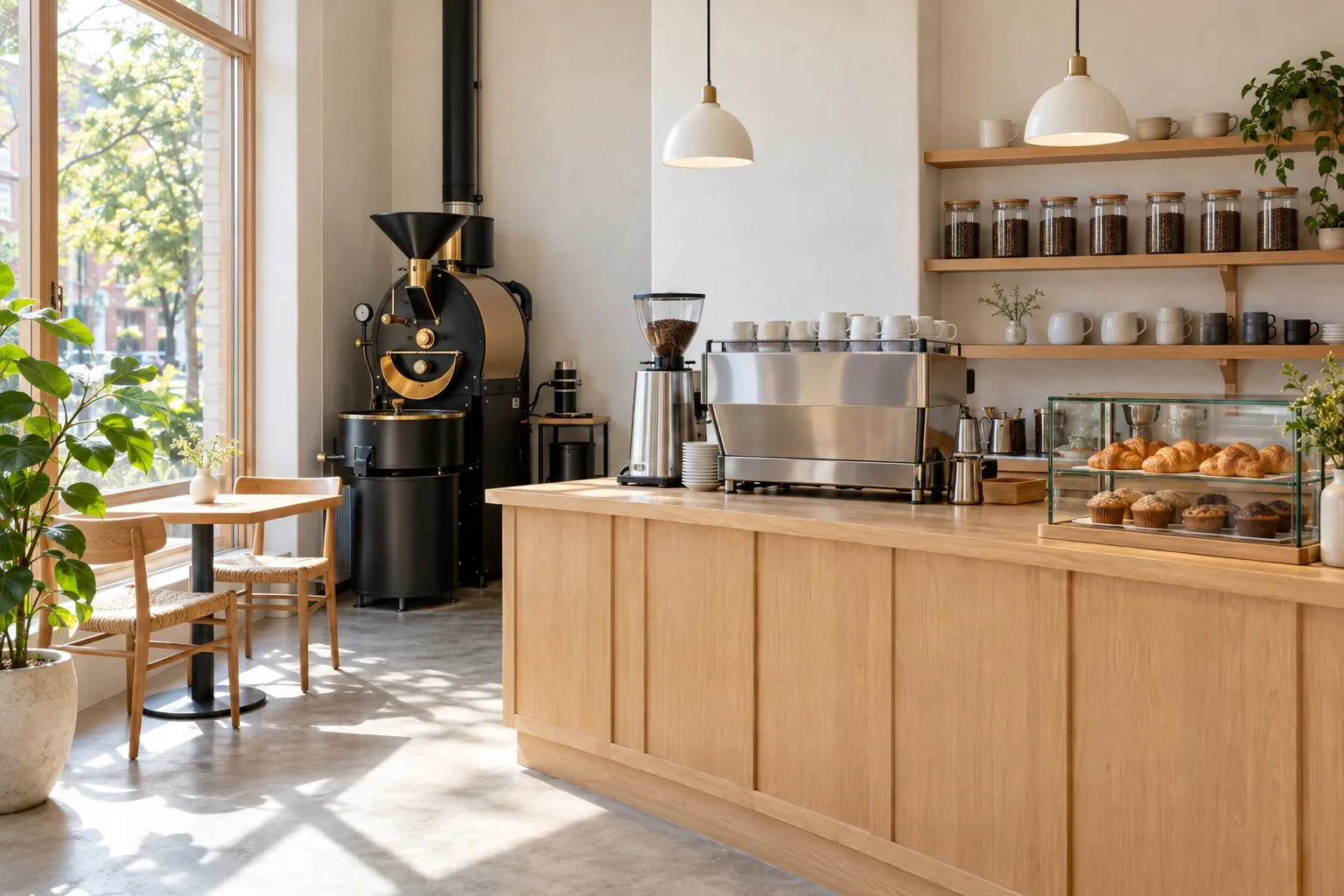
1. 窓際の2人席
朝は窓から光が入る、向かい合わせの2人席です。足元にコンセントが1口あります。
2. 焙煎機
毎週火曜と金曜の朝に、その週に出す豆を店内で焼いています。焼いている間は香りが店の外まで届きます。
3. グラインダー
注文を受けてから1杯分だけ挽きます。挽き目は豆の種類と淹れ方に合わせて変えています。
4. エスプレッソマシン
2杯を同時に抽出できます。ラテなどミルクを使う飲み物も、ここで泡立てて仕上げます。
5. 豆の棚
常に7種類の豆を置いています。瓶の中の豆の色で焙煎の深さを見比べられ、100gから量り売りします。
6. 焼き菓子のケース
クロワッサンとマフィンは近くのパン屋から毎朝届きます。売り切れた時点で終わりです。
"use client";

import {
  useEffect,
  useId,
  useLayoutEffect,
  useRef,
  useState,
  useSyncExternalStore,
  type CSSProperties,
  type KeyboardEvent,
} from "react";

/**
 * 写真の注釈ピン(番号の点を押すと説明が出る)(BLK-101)
 *
 * 差別化: isometric-floor-map は自作の立体模型を自由に見て回る型、coachmark-product-tour は画面の部品を決まった順に
 * 照らす操作案内で、実写1枚に注釈を重ねる型は無かった。本ブロックは写真に対する割合で持った点を、切り抜き方を
 * 変えても同じ物の上に置き続け、同じ説明を写真の下の番号付きリストにも出す。英字キッカー・末尾の矢印リンク・角丸は外した。
 *
 * 汎用技法メモ:
 * 1) 切り抜いても点がずれない座標: 点は元写真に対する割合 (x, y) で持つ。写真の枠を container-type: size にし、
 *    object-fit: cover で描かれる写真の大きさを CSS だけで再現する。
 *      --dw: max(100cqw, 100cqh * 縦横比)  --dh: max(100cqh, 100cqw / 縦横比)
 *      left: calc((100cqw - var(--dw)) * 焦点x + var(--dw) * x)   top も同様
 *    焦点は object-position と同じ値にする。JS で測らないので、サーバー描画の時点から位置が合っている。
 * 2) 狭いときの切り替え: ResizeObserver で枠の大きさを受け、同じ式で点どうしの最短距離を出す。
 *    枠が狭い・点が近すぎる・点が枠の外に出たときは、点を小さな番号だけにして説明を写真の下に出す(吹き出しで写真を隠さない)。
 * 3) 開閉の作法: 点は名前つきの button で aria-expanded と aria-controls を持つ開閉ボタン。開いてもフォーカスは点に残し、
 *    Tab で次に説明の中のボタンへ進めるよう、吹き出しは点の直後に置く。前へ・次へは押したボタンへフォーカスを戻し、
 *    閉じるボタンと Esc は点へフォーカスを返す。点の上の左右キーで前後の点へ移る。吹き出しの出現は @starting-style
 *    (Tailwind の starting:)で opacity と transform だけを動かし、prefers-reduced-motion では動かさない。
 */

type Spot = { x: number; y: number; title: string; body: string };

const PHOTO = {
  src: "/designs/image-hotspot-tour.webp",
  w: 1536,
  h: 1024,
  alt: "自家焙煎のコーヒースタンドの店内。左の大きな窓際に木の2人席、奥の壁際に黒い焙煎機、中央の木のカウンターにグラインダーとエスプレッソマシン、右の壁の棚に豆の入ったガラス瓶、カウンターの右端に焼き菓子のケースがある",
};

/** object-position と同じ焦点(0〜1) */
const FOCUS = { x: 0.5, y: 0.5 };

const SPOTS: Spot[] = [
  {
    x: 0.15,
    y: 0.56,
    title: "窓際の2人席",
    body: "朝は窓から光が入る、向かい合わせの2人席です。足元にコンセントが1口あります。",
  },
  {
    x: 0.31,
    y: 0.39,
    title: "焙煎機",
    body: "毎週火曜と金曜の朝に、その週に出す豆を店内で焼いています。焼いている間は香りが店の外まで届きます。",
  },
  {
    x: 0.485,
    y: 0.4,
    title: "グラインダー",
    body: "注文を受けてから1杯分だけ挽きます。挽き目は豆の種類と淹れ方に合わせて変えています。",
  },
  {
    x: 0.62,
    y: 0.46,
    title: "エスプレッソマシン",
    body: "2杯を同時に抽出できます。ラテなどミルクを使う飲み物も、ここで泡立てて仕上げます。",
  },
  {
    x: 0.83,
    y: 0.25,
    title: "豆の棚",
    body: "常に7種類の豆を置いています。瓶の中の豆の色で焙煎の深さを見比べられ、100gから量り売りします。",
  },
  {
    x: 0.88,
    y: 0.55,
    title: "焼き菓子のケース",
    body: "クロワッサンとマフィンは近くのパン屋から毎朝届きます。売り切れた時点で終わりです。",
  },
];

const N = SPOTS.length;
const pad = (n: number) => String(n).padStart(2, "0");

const FRAMES = [
  { id: "wide", label: "横長", ratio: "2:1", ar: 2 },
  { id: "photo", label: "元の比率", ratio: "3:2", ar: 3 / 2 },
  { id: "std", label: "標準", ratio: "4:3", ar: 4 / 3 },
] as const;
type FrameId = (typeof FRAMES)[number]["id"];

/** 枠より狭い・点がこれより近いときは番号だけの点にして、説明を写真の下に出す */
const COMPACT_WIDTH = 600;
const MIN_GAP = 44;

const NARROW_QUERY = "(max-width: 639px)";
const isNarrow = () => window.matchMedia(NARROW_QUERY).matches;
function subscribeNarrow(cb: () => void) {
  const mq = window.matchMedia(NARROW_QUERY);
  mq.addEventListener("change", cb);
  return () => mq.removeEventListener("change", cb);
}

type Layout = { w: number; h: number; pts: { x: number; y: number; inside: boolean }[] };

/** object-fit: cover と同じ計算で、枠の中での点の位置を出す(CSS の calc と同じ式) */
function layoutFor(w: number, h: number): Layout {
  const ar = PHOTO.w / PHOTO.h;
  const dw = Math.max(w, h * ar);
  const dh = Math.max(h, w / ar);
  const pts = SPOTS.map((s) => {
    const x = (w - dw) * FOCUS.x + dw * s.x;
    const y = (h - dh) * FOCUS.y + dh * s.y;
    return { x, y, inside: x >= 12 && x <= w - 12 && y >= 12 && y <= h - 12 };
  });
  return { w, h, pts };
}

const PIN_POS = (s: Spot): CSSProperties => ({
  left: `calc((100cqw - var(--dw)) * ${FOCUS.x} + var(--dw) * ${s.x})`,
  top: `calc((100cqh - var(--dh)) * ${FOCUS.y} + var(--dh) * ${s.y})`,
});

const FOCUS_RING = "focus-visible:outline-2 focus-visible:outline-offset-2 focus-visible:outline-amber-600";
const NAV_BTN = `inline-flex h-9 items-center gap-1.5 border border-stone-300 bg-white px-3 text-[12px] font-bold text-stone-800 transition-colors hover:border-stone-900 disabled:cursor-not-allowed disabled:border-stone-200 disabled:text-stone-300 motion-reduce:transition-none ${FOCUS_RING}`;

export default function ImageHotspotTour() {
  const uid = useId();
  const headingId = `${uid}-heading`;
  const panelId = `${uid}-note`;
  const noteTitleId = `${uid}-note-title`;

  const [active, setActive] = useState<number | null>(null);
  // 未選択の間は画面幅で決める(狭い画面は 4:3。2:1 では写真が低くなりすぎる)
  const [picked, setPicked] = useState<FrameId | null>(null);
  const narrow = useSyncExternalStore(subscribeNarrow, isNarrow, () => false);
  const frame: FrameId = picked ?? (narrow ? "std" : "wide");
  const [layout, setLayout] = useState<Layout | null>(null);
  const [touched, setTouched] = useState(false);
  const [announce, setAnnounce] = useState("");

  const frameRef = useRef<HTMLDivElement>(null);
  const pinRefs = useRef<(HTMLButtonElement | null)[]>([]);
  const prevRef = useRef<HTMLButtonElement>(null);
  const nextRef = useRef<HTMLButtonElement>(null);
  const pendingFocus = useRef<"prev" | "next" | null>(null);

  useEffect(() => {
    const el = frameRef.current;
    if (!el) return;
    const ro = new ResizeObserver(([entry]) => {
      const { width, height } = entry.contentRect;
      setLayout(layoutFor(width, height));
    });
    ro.observe(el);
    return () => ro.disconnect();
  }, []);

  let minGap = Infinity;
  if (layout) {
    const pts = layout.pts.filter((p) => p.inside);
    for (let i = 0; i < pts.length; i++)
      for (let j = i + 1; j < pts.length; j++)
        minGap = Math.min(minGap, Math.hypot(pts[i].x - pts[j].x, pts[i].y - pts[j].y));
  }
  const compact = layout !== null && (layout.w < COMPACT_WIDTH || minGap < MIN_GAP);
  const isInside = (i: number) => !layout || layout.pts[i].inside;
  // 吹き出しを写真の上に出せないとき(狭い・近い・点が枠の外)は、説明を写真の下に出す
  const noteBelow = compact || (active !== null && !isInside(active));

  // 前へ・次へで説明が別の点の下へ移っても、押したボタンにフォーカスを戻す
  useLayoutEffect(() => {
    const target = pendingFocus.current;
    if (!target) return;
    pendingFocus.current = null;
    (target === "prev" ? prevRef : nextRef).current?.focus();
  }, [active]);

  const open = (i: number) => {
    setTouched(true);
    setActive(i);
    setAnnounce(`${i + 1} / ${N}、${SPOTS[i].title}`);
  };
  const close = (returnFocus: boolean) => {
    const i = active;
    setActive(null);
    setAnnounce("");
    if (returnFocus && i !== null) pinRefs.current[i]?.focus();
  };
  const step = (dir: -1 | 1) => {
    if (active === null) return;
    const n = active + dir;
    if (n < 0 || n >= N) return;
    pendingFocus.current = dir < 0 ? "prev" : "next";
    open(n);
  };

  const onRootKeyDown = (e: KeyboardEvent<HTMLElement>) => {
    if (e.key === "Escape" && active !== null) {
      e.preventDefault();
      close(true);
    }
  };

  const onPinKeyDown = (e: KeyboardEvent<HTMLButtonElement>, i: number) => {
    let n: number | null = null;
    if (e.key === "ArrowRight" || e.key === "ArrowDown") n = Math.min(N - 1, i + 1);
    else if (e.key === "ArrowLeft" || e.key === "ArrowUp") n = Math.max(0, i - 1);
    else if (e.key === "Home") n = 0;
    else if (e.key === "End") n = N - 1;
    if (n === null) return;
    e.preventDefault();
    pinRefs.current[n]?.focus();
    if (active !== null) open(n);
  };

  const showFromList = (i: number) => {
    open(i);
    const pin = pinRefs.current[i];
    if (!pin) return;
    const smooth = !window.matchMedia("(prefers-reduced-motion: reduce)").matches;
    frameRef.current?.scrollIntoView({ block: "nearest", behavior: smooth ? "smooth" : "auto" });
    pin.focus({ preventScroll: true });
  };

  const frameDef = FRAMES.find((f) => f.id === frame)!;

  const note = (placement: "bubble" | "below") => {
    if (active === null) return null;
    const s = SPOTS[active];
    let side = "";
    if (placement === "bubble" && layout) {
      const p = layout.pts[active];
      const horiz = p.x / layout.w > 0.55 ? "right-6" : "left-6";
      const vert = p.y / layout.h > 0.5 ? "bottom-[-0.75rem]" : "top-[-0.75rem]";
      side = `${horiz} ${vert}`;
    } else if (placement === "bubble") {
      side = `${s.x > 0.55 ? "right-6" : "left-6"} ${s.y > 0.5 ? "bottom-[-0.75rem]" : "top-[-0.75rem]"}`;
    }
    return (
      <div
        id={panelId}
        role="group"
        aria-labelledby={noteTitleId}
        className={
          placement === "bubble"
            ? `absolute z-20 w-[18rem] border border-stone-300 bg-white p-4 text-left shadow-[0_18px_40px_-22px_rgba(28,25,23,0.5)] transition-[opacity,transform] duration-200 ease-out starting:translate-y-1 starting:opacity-0 motion-reduce:transition-none print:hidden ${side}`
            : "border-b border-stone-200 py-4 transition-[opacity,transform] duration-200 ease-out starting:translate-y-1 starting:opacity-0 motion-reduce:transition-none print:hidden"
        }
      >
        <div className="flex items-start justify-between gap-3">
          <h3 id={noteTitleId} className="text-[15px] leading-[1.5] font-bold text-stone-900">
            <span className="font-display mr-2 text-[12px] font-bold tabular-nums text-amber-700">{pad(active + 1)}</span>
            {s.title}
          </h3>
          <button
            type="button"
            onClick={() => close(true)}
            className={`-mt-1 -mr-1 inline-flex h-8 w-8 shrink-0 items-center justify-center text-stone-500 transition-colors hover:text-stone-900 motion-reduce:transition-none ${FOCUS_RING}`}
          >
            <svg aria-hidden="true" viewBox="0 0 16 16" className="h-3.5 w-3.5" fill="none">
              <path d="M3 3l10 10M13 3L3 13" stroke="currentColor" strokeWidth="1.6" />
            </svg>
            <span className="sr-only">説明を閉じる</span>
          </button>
        </div>
        <p className="mt-2 text-[13px] leading-[1.85] text-stone-600">{s.body}</p>
        <div className="mt-4 flex items-center justify-between gap-2 border-t border-stone-200 pt-3">
          <button ref={prevRef} type="button" onClick={() => step(-1)} disabled={active === 0} className={NAV_BTN}>
            <svg aria-hidden="true" viewBox="0 0 16 16" className="h-3 w-3" fill="none">
              <path d="M10 3L5 8l5 5" stroke="currentColor" strokeWidth="1.6" />
            </svg>
            前へ
          </button>
          <p className="font-display text-[11px] font-semibold tabular-nums text-stone-400">
            {pad(active + 1)} / {pad(N)}
          </p>
          <button ref={nextRef} type="button" onClick={() => step(1)} disabled={active === N - 1} className={NAV_BTN}>
            次へ
            <svg aria-hidden="true" viewBox="0 0 16 16" className="h-3 w-3" fill="none">
              <path d="M6 3l5 5-5 5" stroke="currentColor" strokeWidth="1.6" />
            </svg>
          </button>
        </div>
      </div>
    );
  };

  return (
    <section
      aria-labelledby={headingId}
      onKeyDown={onRootKeyDown}
      className="w-full max-w-6xl bg-white px-1 text-stone-900"
    >
      <div className="flex items-baseline justify-between gap-4 border-b border-stone-200 pb-3">
        <p className="font-display text-[11px] font-semibold tracking-wide text-stone-500">
          BLK-101 <span aria-hidden="true" className="text-stone-300">/</span>{" "}
          <span className="font-sans">写真の注釈ピン</span>
        </p>
        <p className="text-[11px] font-medium text-stone-400">
          <span className="font-display tabular-nums">{N}</span>か所
        </p>
      </div>

      <div className="mt-8 grid gap-4 sm:grid-cols-[minmax(0,1.15fr)_minmax(0,1fr)] sm:items-end sm:gap-12">
        <h2
          id={headingId}
          className="text-[clamp(1.55rem,3.6vw,2.3rem)] leading-[1.4] font-bold tracking-tight text-stone-900"
        >
          {/* 文節ごとに inline-block にして、語の途中で折り返さない */}
          <span className="inline-block">カウンターまわりの</span>
          <span className="inline-block">6か所を</span>
          <span className="inline-block">写真の上で</span>
          <span className="inline-block">ご案内します</span>
        </h2>
        <p className="text-[14px] leading-[1.9] font-medium text-stone-600 sm:text-[15px]">
          番号を押すと、その場所の説明が写真の上に出ます。前へ・次へのボタンで1番から順に回れて、Esc キーで閉じます。同じ説明は写真の下の一覧にも載せています。
        </p>
      </div>

      <div className="mt-8 flex flex-wrap items-center justify-between gap-3 border-y border-stone-200 py-2.5 print:hidden">
        <div role="group" aria-label="写真の切り抜き方" className="flex items-center gap-1">
          <span className="mr-2 text-[11px] font-medium text-stone-500">切り抜き</span>
          {FRAMES.map((f) => (
            <button
              key={f.id}
              type="button"
              aria-pressed={frame === f.id}
              onClick={() => setPicked(f.id)}
              className={`inline-flex h-8 items-center gap-1.5 border px-2.5 text-[12px] font-bold transition-colors motion-reduce:transition-none ${FOCUS_RING} ${
                frame === f.id
                  ? "border-stone-900 bg-stone-900 text-white"
                  : "border-stone-200 bg-white text-stone-600 hover:border-stone-400"
              }`}
            >
              {f.label}
              <span className={`font-display text-[10px] tabular-nums ${frame === f.id ? "text-amber-300" : "text-stone-400"}`}>
                {f.ratio}
              </span>
            </button>
          ))}
        </div>
        <p className="text-[11px] text-stone-500">切り抜きを変えても、点は同じ物の上に残ります</p>
      </div>

      <figure className="mt-4">
        <div
          ref={frameRef}
          onClick={(e) => {
            if (e.target === e.currentTarget || (e.target as HTMLElement).tagName === "IMG") close(false);
          }}
          style={
            {
              aspectRatio: frameDef.ar,
              containerType: "size",
              "--dw": `max(100cqw, 100cqh * ${PHOTO.w / PHOTO.h})`,
              "--dh": `max(100cqh, 100cqw / ${PHOTO.w / PHOTO.h})`,
            } as CSSProperties
          }
          className="relative w-full bg-stone-100"
        >
          {/* eslint-disable-next-line @next/next/no-img-element -- 静的書き出しのため最適化なしの img を使う */}
          <img
            src={PHOTO.src}
            alt={PHOTO.alt}
            width={PHOTO.w}
            height={PHOTO.h}
            decoding="async"
            draggable={false}
            style={{ objectPosition: `${FOCUS.x * 100}% ${FOCUS.y * 100}%` }}
            className="absolute inset-0 block h-full w-full object-cover select-none"
          />

          {SPOTS.map((s, i) => {
            const isActive = active === i;
            const hidden = !isInside(i);
            return (
              <div
                key={s.title}
                style={PIN_POS(s)}
                className={`absolute h-0 w-0 ${isActive ? "z-20" : "z-10"} ${hidden ? "hidden" : ""}`}
              >
                <button
                  ref={(el) => {
                    pinRefs.current[i] = el;
                  }}
                  type="button"
                  aria-expanded={isActive}
                  aria-controls={panelId}
                  aria-label={`${i + 1}. ${s.title}`}
                  onClick={() => (isActive ? close(false) : open(i))}
                  onKeyDown={(e) => onPinKeyDown(e, i)}
                  className={`font-display absolute top-0 left-0 inline-flex -translate-x-1/2 -translate-y-1/2 items-center justify-center border font-bold tabular-nums shadow-[0_4px_14px_-6px_rgba(28,25,23,0.6)] transition-[transform,background-color,border-color,color] duration-200 motion-reduce:transition-none ${FOCUS_RING} ${
                    compact ? "h-6 w-6 text-[10px]" : "h-8 w-8 text-[11px] hover:scale-110 motion-reduce:hover:scale-100"
                  } ${isActive ? "border-amber-600 bg-amber-600 text-white" : "border-white bg-white/95 text-stone-900"}`}
                >
                  {pad(i + 1)}
                  {i === 0 && !touched && (
                    <span
                      aria-hidden="true"
                      className="pointer-events-none absolute -inset-1 border border-amber-500 motion-safe:animate-ping motion-reduce:hidden"
                    />
                  )}
                </button>
                {isActive && !noteBelow && note("bubble")}
              </div>
            );
          })}
        </div>

        {noteBelow && note("below")}

        <figcaption className="mt-3 text-[11px] leading-[1.7] text-stone-500 print:hidden">
          番号の上で左右のキーを押すと前後の番号へ移ります。
        </figcaption>
      </figure>

      <ol className="mt-10 grid list-none gap-x-10 p-0 sm:grid-cols-2 lg:grid-cols-3" aria-label="写真の注釈の一覧">
        {SPOTS.map((s, i) => (
          <li key={s.title} className="grid grid-cols-[2.25rem_minmax(0,1fr)] gap-x-2 border-t border-stone-200 py-4">
            <span
              aria-hidden="true"
              className={`font-display pt-0.5 text-[13px] font-bold tabular-nums ${active === i ? "text-amber-700" : "text-stone-400"}`}
            >
              {pad(i + 1)}
            </span>
            <div>
              <h3 className="text-[14px] leading-[1.6] font-bold text-stone-900">
                <span className="sr-only">{i + 1}. </span>
                {s.title}
              </h3>
              <p className="mt-1 text-[13px] leading-[1.85] text-stone-600">{s.body}</p>
              <button
                type="button"
                onClick={() => showFromList(i)}
                className={`mt-2 text-[12px] font-bold text-stone-700 underline decoration-stone-300 underline-offset-4 transition-colors hover:decoration-amber-600 motion-reduce:transition-none print:hidden ${FOCUS_RING}`}
              >
                写真の上で見る
                <span className="sr-only">({s.title})</span>
              </button>
            </div>
          </li>
        ))}
      </ol>

      <p aria-live="polite" className="sr-only">
        {announce}
      </p>
    </section>
  );
}
Add to your project via shadcn CLI
npx shadcn@latest add https://designs.first-ch.com/r/image-hotspot-tour.json