
写真の注釈ピン(番号の点を押すと説明が出る)
店内や製品の写真1枚の上に番号つきの点を置き、押すとその場所の説明が吹き出しで出る注釈ブロックです。点の位置は元の写真に対する割合で持ち、写真の枠を container-type: size にしたうえで object-fit: cover と同じ計算を CSS の calc と cqw・cqh 単位で行うため、写真の切り抜き方(2:1・3:2・4:3)を変えても点は同じ物の上に残ります。点は名前つきの button で aria-expanded と aria-controls によって説明と結び、前へ・次へで番号順に回れて、閉じるボタンと Esc キーで閉じると点へフォーカスが戻ります。点の上では左右キーと Home/End で前後の点へ移れるので、キーボードだけで操作が完結します。枠が狭いときや点どうしが近いときは、点を番号だけの小さな印にして説明を写真の下に出し、写真を吹き出しで隠しません。同じ説明は写真の下に番号付きリストでも載せており、スクリーンリーダーや印刷でも内容を読めます。吹き出しの出現は opacity と transform だけを動かし、prefers-reduced-motion では動きを止めます。新規の依存はありません。
- 追加日:
- 2026-10-18
- 依存:
- なし
- tags
- #image-hotspot #annotation #photo #disclosure #container-query #object-fit #keyboard #a11y #print #no-dependency
プレビュー
BLK-101 写真の注釈ピン
6か所
カウンターまわりの6か所を写真の上でご案内します
番号を押すと、その場所の説明が写真の上に出ます。前へ・次へのボタンで1番から順に回れて、Esc キーで閉じます。同じ説明は写真の下の一覧にも載せています。
切り抜きを変えても、点は同じ物の上に残ります
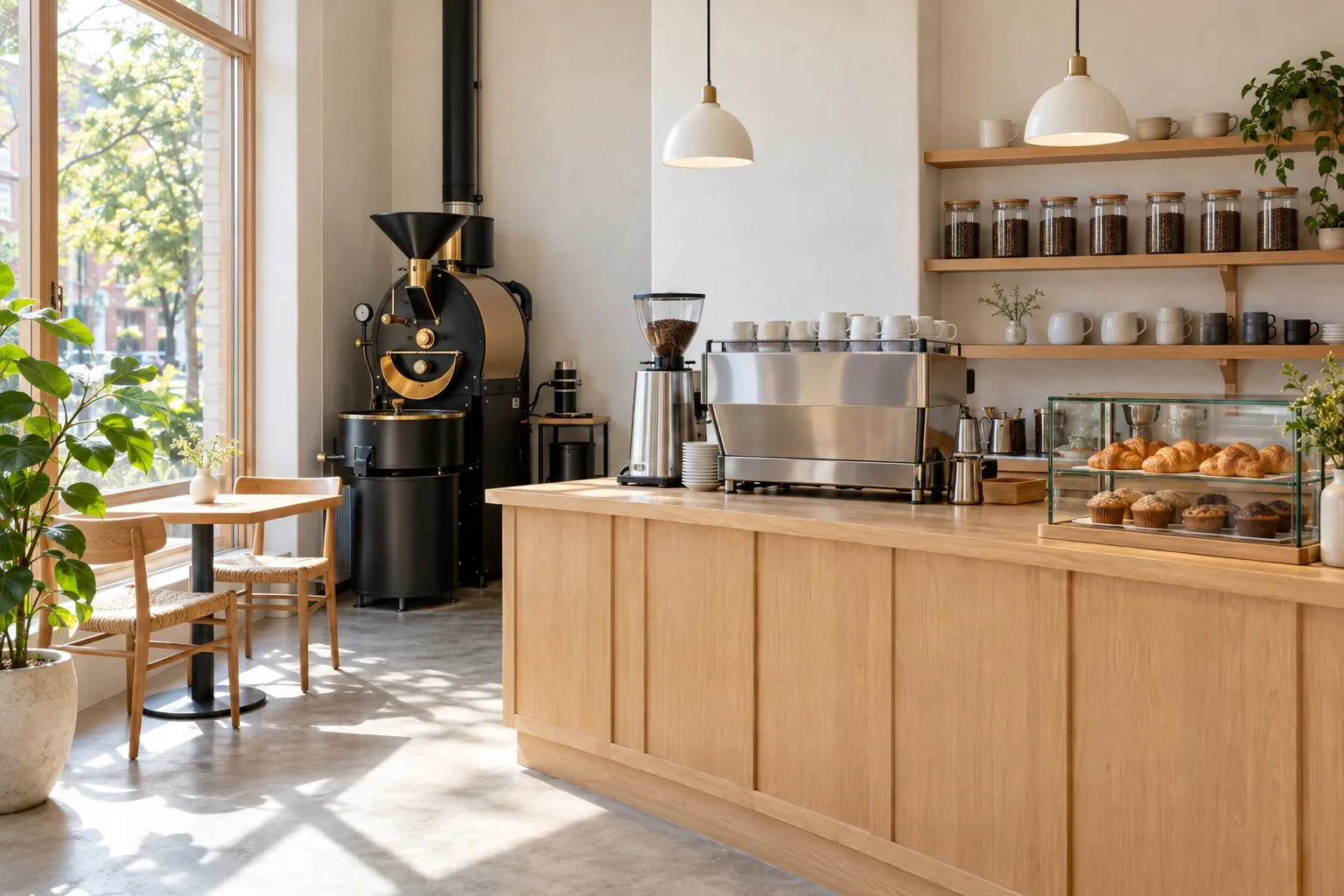
1. 窓際の2人席
朝は窓から光が入る、向かい合わせの2人席です。足元にコンセントが1口あります。
2. 焙煎機
毎週火曜と金曜の朝に、その週に出す豆を店内で焼いています。焼いている間は香りが店の外まで届きます。
3. グラインダー
注文を受けてから1杯分だけ挽きます。挽き目は豆の種類と淹れ方に合わせて変えています。
4. エスプレッソマシン
2杯を同時に抽出できます。ラテなどミルクを使う飲み物も、ここで泡立てて仕上げます。
5. 豆の棚
常に7種類の豆を置いています。瓶の中の豆の色で焙煎の深さを見比べられ、100gから量り売りします。
6. 焼き菓子のケース
クロワッサンとマフィンは近くのパン屋から毎朝届きます。売り切れた時点で終わりです。
"use client";

import {
  useEffect,
  useId,
  useLayoutEffect,
  useRef,
  useState,
  useSyncExternalStore,
  type CSSProperties,
  type KeyboardEvent,
} from "react";

/**
 * 写真の注釈ピン(番号の点を押すと説明が出る)(BLK-101)
 *
 * 差別化: isometric-floor-map は自作の立体模型を自由に見て回る型、coachmark-product-tour は画面の部品を決まった順に
 * 照らす操作案内で、実写1枚に注釈を重ねる型は無かった。本ブロックは写真に対する割合で持った点を、切り抜き方を
 * 変えても同じ物の上に置き続け、同じ説明を写真の下の番号付きリストにも出す。英字キッカー・末尾の矢印リンク・角丸は外した。
 *
 * 汎用技法メモ:
 * 1) 切り抜いても点がずれない座標: 点は元写真に対する割合 (x, y) で持つ。写真の枠を container-type: size にし、
 *    object-fit: cover で描かれる写真の大きさを CSS だけで再現する。
 *      --dw: max(100cqw, 100cqh * 縦横比)  --dh: max(100cqh, 100cqw / 縦横比)
 *      left: calc((100cqw - var(--dw)) * 焦点x + var(--dw) * x)   top も同様
 *    焦点は object-position と同じ値にする。JS で測らないので、サーバー描画の時点から位置が合っている。
 * 2) 狭いときの切り替え: ResizeObserver で枠の大きさを受け、同じ式で点どうしの最短距離を出す。
 *    枠が狭い・点が近すぎる・点が枠の外に出たときは、点を小さな番号だけにして説明を写真の下に出す(吹き出しで写真を隠さない)。
 * 3) 開閉の作法: 点は名前つきの button で aria-expanded と aria-controls を持つ開閉ボタン。開いてもフォーカスは点に残し、
 *    Tab で次に説明の中のボタンへ進めるよう、吹き出しは点の直後に置く。前へ・次へは押したボタンへフォーカスを戻し、
 *    閉じるボタンと Esc は点へフォーカスを返す。点の上の左右キーで前後の点へ移る。吹き出しの出現は @starting-style
 *    (Tailwind の starting:)で opacity と transform だけを動かし、prefers-reduced-motion では動かさない。
 */

type Spot = { x: number; y: number; title: string; body: string };

const PHOTO = {
  src: "/designs/image-hotspot-tour.webp",
  w: 1536,
  h: 1024,
  alt: "自家焙煎のコーヒースタンドの店内。左の大きな窓際に木の2人席、奥の壁際に黒い焙煎機、中央の木のカウンターにグラインダーとエスプレッソマシン、右の壁の棚に豆の入ったガラス瓶、カウンターの右端に焼き菓子のケースがある",
};

/** object-position と同じ焦点(0〜1) */
const FOCUS = { x: 0.5, y: 0.5 };

const SPOTS: Spot[] = [
  {
    x: 0.15,
    y: 0.56,
    title: "窓際の2人席",
    body: "朝は窓から光が入る、向かい合わせの2人席です。足元にコンセントが1口あります。",
  },
  {
    x: 0.31,
    y: 0.39,
    title: "焙煎機",
    body: "毎週火曜と金曜の朝に、その週に出す豆を店内で焼いています。焼いている間は香りが店の外まで届きます。",
  },
  {
    x: 0.485,
    y: 0.4,
    title: "グラインダー",
    body: "注文を受けてから1杯分だけ挽きます。挽き目は豆の種類と淹れ方に合わせて変えています。",
  },
  {
    x: 0.62,
    y: 0.46,
    title: "エスプレッソマシン",
    body: "2杯を同時に抽出できます。ラテなどミルクを使う飲み物も、ここで泡立てて仕上げます。",
  },
  {
    x: 0.83,
    y: 0.25,
    title: "豆の棚",
    body: "常に7種類の豆を置いています。瓶の中の豆の色で焙煎の深さを見比べられ、100gから量り売りします。",
  },
  {
    x: 0.88,
    y: 0.55,
    title: "焼き菓子のケース",
    body: "クロワッサンとマフィンは近くのパン屋から毎朝届きます。売り切れた時点で終わりです。",
  },
];

const N = SPOTS.length;
const pad = (n: number) => String(n).padStart(2, "0");

const FRAMES = [
  { id: "wide", label: "横長", ratio: "2:1", ar: 2 },
  { id: "photo", label: "元の比率", ratio: "3:2", ar: 3 / 2 },
  { id: "std", label: "標準", ratio: "4:3", ar: 4 / 3 },
] as const;
type FrameId = (typeof FRAMES)[number]["id"];

/** 枠より狭い・点がこれより近いときは番号だけの点にして、説明を写真の下に出す */
const COMPACT_WIDTH = 600;
const MIN_GAP = 44;

const NARROW_QUERY = "(max-width: 639px)";
const isNarrow = () => window.matchMedia(NARROW_QUERY).matches;
function subscribeNarrow(cb: () => void) {
  const mq = window.matchMedia(NARROW_QUERY);
  mq.addEventListener("change", cb);
  return () => mq.removeEventListener("change", cb);
}

type Layout = { w: number; h: number; pts: { x: number; y: number; inside: boolean }[] };

/** object-fit: cover と同じ計算で、枠の中での点の位置を出す(CSS の calc と同じ式) */
function layoutFor(w: number, h: number): Layout {
  const ar = PHOTO.w / PHOTO.h;
  const dw = Math.max(w, h * ar);
  const dh = Math.max(h, w / ar);
  const pts = SPOTS.map((s) => {
    const x = (w - dw) * FOCUS.x + dw * s.x;
    const y = (h - dh) * FOCUS.y + dh * s.y;
    return { x, y, inside: x >= 12 && x <= w - 12 && y >= 12 && y <= h - 12 };
  });
  return { w, h, pts };
}

const PIN_POS = (s: Spot): CSSProperties => ({
  left: `calc((100cqw - var(--dw)) * ${FOCUS.x} + var(--dw) * ${s.x})`,
  top: `calc((100cqh - var(--dh)) * ${FOCUS.y} + var(--dh) * ${s.y})`,
});

const FOCUS_RING = "focus-visible:outline-2 focus-visible:outline-offset-2 focus-visible:outline-amber-600";
const NAV_BTN = `inline-flex h-9 items-center gap-1.5 border border-stone-300 bg-white px-3 text-[12px] font-bold text-stone-800 transition-colors hover:border-stone-900 disabled:cursor-not-allowed disabled:border-stone-200 disabled:text-stone-300 motion-reduce:transition-none ${FOCUS_RING}`;

export default function ImageHotspotTour() {
  const uid = useId();
  const headingId = `${uid}-heading`;
  const panelId = `${uid}-note`;
  const noteTitleId = `${uid}-note-title`;

  const [active, setActive] = useState<number | null>(null);
  // 未選択の間は画面幅で決める(狭い画面は 4:3。2:1 では写真が低くなりすぎる)
  const [picked, setPicked] = useState<FrameId | null>(null);
  const narrow = useSyncExternalStore(subscribeNarrow, isNarrow, () => false);
  const frame: FrameId = picked ?? (narrow ? "std" : "wide");
  const [layout, setLayout] = useState<Layout | null>(null);
  const [touched, setTouched] = useState(false);
  const [announce, setAnnounce] = useState("");

  const frameRef = useRef<HTMLDivElement>(null);
  const pinRefs = useRef<(HTMLButtonElement | null)[]>([]);
  const prevRef = useRef<HTMLButtonElement>(null);
  const nextRef = useRef<HTMLButtonElement>(null);
  const pendingFocus = useRef<"prev" | "next" | null>(null);

  useEffect(() => {
    const el = frameRef.current;
    if (!el) return;
    const ro = new ResizeObserver(([entry]) => {
      const { width, height } = entry.contentRect;
      setLayout(layoutFor(width, height));
    });
    ro.observe(el);
    return () => ro.disconnect();
  }, []);

  let minGap = Infinity;
  if (layout) {
    const pts = layout.pts.filter((p) => p.inside);
    for (let i = 0; i < pts.length; i++)
      for (let j = i + 1; j < pts.length; j++)
        minGap = Math.min(minGap, Math.hypot(pts[i].x - pts[j].x, pts[i].y - pts[j].y));
  }
  const compact = layout !== null && (layout.w < COMPACT_WIDTH || minGap < MIN_GAP);
  const isInside = (i: number) => !layout || layout.pts[i].inside;
  // 吹き出しを写真の上に出せないとき(狭い・近い・点が枠の外)は、説明を写真の下に出す
  const noteBelow = compact || (active !== null && !isInside(active));

  // 前へ・次へで説明が別の点の下へ移っても、押したボタンにフォーカスを戻す
  useLayoutEffect(() => {
    const target = pendingFocus.current;
    if (!target) return;
    pendingFocus.current = null;
    (target === "prev" ? prevRef : nextRef).current?.focus();
  }, [active]);

  const open = (i: number) => {
    setTouched(true);
    setActive(i);
    setAnnounce(`${i + 1} / ${N}、${SPOTS[i].title}`);
  };
  const close = (returnFocus: boolean) => {
    const i = active;
    setActive(null);
    setAnnounce("");
    if (returnFocus && i !== null) pinRefs.current[i]?.focus();
  };
  const step = (dir: -1 | 1) => {
    if (active === null) return;
    const n = active + dir;
    if (n < 0 || n >= N) return;
    pendingFocus.current = dir < 0 ? "prev" : "next";
    open(n);
  };

  const onRootKeyDown = (e: KeyboardEvent<HTMLElement>) => {
    if (e.key === "Escape" && active !== null) {
      e.preventDefault();
      close(true);
    }
  };

  const onPinKeyDown = (e: KeyboardEvent<HTMLButtonElement>, i: number) => {
    let n: number | null = null;
    if (e.key === "ArrowRight" || e.key === "ArrowDown") n = Math.min(N - 1, i + 1);
    else if (e.key === "ArrowLeft" || e.key === "ArrowUp") n = Math.max(0, i - 1);
    else if (e.key === "Home") n = 0;
    else if (e.key === "End") n = N - 1;
    if (n === null) return;
    e.preventDefault();
    pinRefs.current[n]?.focus();
    if (active !== null) open(n);
  };

  const showFromList = (i: number) => {
    open(i);
    const pin = pinRefs.current[i];
    if (!pin) return;
    const smooth = !window.matchMedia("(prefers-reduced-motion: reduce)").matches;
    frameRef.current?.scrollIntoView({ block: "nearest", behavior: smooth ? "smooth" : "auto" });
    pin.focus({ preventScroll: true });
  };

  const frameDef = FRAMES.find((f) => f.id === frame)!;

  const note = (placement: "bubble" | "below") => {
    if (active === null) return null;
    const s = SPOTS[active];
    let side = "";
    if (placement === "bubble" && layout) {
      const p = layout.pts[active];
      const horiz = p.x / layout.w > 0.55 ? "right-6" : "left-6";
      const vert = p.y / layout.h > 0.5 ? "bottom-[-0.75rem]" : "top-[-0.75rem]";
      side = `${horiz} ${vert}`;
    } else if (placement === "bubble") {
      side = `${s.x > 0.55 ? "right-6" : "left-6"} ${s.y > 0.5 ? "bottom-[-0.75rem]" : "top-[-0.75rem]"}`;
    }
    return (
      <div
        id={panelId}
        role="group"
        aria-labelledby={noteTitleId}
        className={
          placement === "bubble"
            ? `absolute z-20 w-[18rem] border border-stone-300 bg-white p-4 text-left shadow-[0_18px_40px_-22px_rgba(28,25,23,0.5)] transition-[opacity,transform] duration-200 ease-out starting:translate-y-1 starting:opacity-0 motion-reduce:transition-none print:hidden ${side}`
            : "border-b border-stone-200 py-4 transition-[opacity,transform] duration-200 ease-out starting:translate-y-1 starting:opacity-0 motion-reduce:transition-none print:hidden"
        }
      >
        <div className="flex items-start justify-between gap-3">
          <h3 id={noteTitleId} className="text-[15px] leading-[1.5] font-bold text-stone-900">
            <span className="font-display mr-2 text-[12px] font-bold tabular-nums text-amber-700">{pad(active + 1)}</span>
            {s.title}
          </h3>
          <button
            type="button"
            onClick={() => close(true)}
            className={`-mt-1 -mr-1 inline-flex h-8 w-8 shrink-0 items-center justify-center text-stone-500 transition-colors hover:text-stone-900 motion-reduce:transition-none ${FOCUS_RING}`}
          >
            <svg aria-hidden="true" viewBox="0 0 16 16" className="h-3.5 w-3.5" fill="none">
              <path d="M3 3l10 10M13 3L3 13" stroke="currentColor" strokeWidth="1.6" />
            </svg>
            <span className="sr-only">説明を閉じる</span>
          </button>
        </div>
        <p className="mt-2 text-[13px] leading-[1.85] text-stone-600">{s.body}</p>
        <div className="mt-4 flex items-center justify-between gap-2 border-t border-stone-200 pt-3">
          <button ref={prevRef} type="button" onClick={() => step(-1)} disabled={active === 0} className={NAV_BTN}>
            <svg aria-hidden="true" viewBox="0 0 16 16" className="h-3 w-3" fill="none">
              <path d="M10 3L5 8l5 5" stroke="currentColor" strokeWidth="1.6" />
            </svg>
            前へ
          </button>
          <p className="font-display text-[11px] font-semibold tabular-nums text-stone-400">
            {pad(active + 1)} / {pad(N)}
          </p>
          <button ref={nextRef} type="button" onClick={() => step(1)} disabled={active === N - 1} className={NAV_BTN}>
            次へ
            <svg aria-hidden="true" viewBox="0 0 16 16" className="h-3 w-3" fill="none">
              <path d="M6 3l5 5-5 5" stroke="currentColor" strokeWidth="1.6" />
            </svg>
          </button>
        </div>
      </div>
    );
  };

  return (
    <section
      aria-labelledby={headingId}
      onKeyDown={onRootKeyDown}
      className="w-full max-w-6xl bg-white px-1 text-stone-900"
    >
      <div className="flex items-baseline justify-between gap-4 border-b border-stone-200 pb-3">
        <p className="font-display text-[11px] font-semibold tracking-wide text-stone-500">
          BLK-101 <span aria-hidden="true" className="text-stone-300">/</span>{" "}
          <span className="font-sans">写真の注釈ピン</span>
        </p>
        <p className="text-[11px] font-medium text-stone-400">
          <span className="font-display tabular-nums">{N}</span>か所
        </p>
      </div>

      <div className="mt-8 grid gap-4 sm:grid-cols-[minmax(0,1.15fr)_minmax(0,1fr)] sm:items-end sm:gap-12">
        <h2
          id={headingId}
          className="text-[clamp(1.55rem,3.6vw,2.3rem)] leading-[1.4] font-bold tracking-tight text-stone-900"
        >
          {/* 文節ごとに inline-block にして、語の途中で折り返さない */}
          <span className="inline-block">カウンターまわりの</span>
          <span className="inline-block">6か所を</span>
          <span className="inline-block">写真の上で</span>
          <span className="inline-block">ご案内します</span>
        </h2>
        <p className="text-[14px] leading-[1.9] font-medium text-stone-600 sm:text-[15px]">
          番号を押すと、その場所の説明が写真の上に出ます。前へ・次へのボタンで1番から順に回れて、Esc キーで閉じます。同じ説明は写真の下の一覧にも載せています。
        </p>
      </div>

      <div className="mt-8 flex flex-wrap items-center justify-between gap-3 border-y border-stone-200 py-2.5 print:hidden">
        <div role="group" aria-label="写真の切り抜き方" className="flex items-center gap-1">
          <span className="mr-2 text-[11px] font-medium text-stone-500">切り抜き</span>
          {FRAMES.map((f) => (
            <button
              key={f.id}
              type="button"
              aria-pressed={frame === f.id}
              onClick={() => setPicked(f.id)}
              className={`inline-flex h-8 items-center gap-1.5 border px-2.5 text-[12px] font-bold transition-colors motion-reduce:transition-none ${FOCUS_RING} ${
                frame === f.id
                  ? "border-stone-900 bg-stone-900 text-white"
                  : "border-stone-200 bg-white text-stone-600 hover:border-stone-400"
              }`}
            >
              {f.label}
              <span className={`font-display text-[10px] tabular-nums ${frame === f.id ? "text-amber-300" : "text-stone-400"}`}>
                {f.ratio}
              </span>
            </button>
          ))}
        </div>
        <p className="text-[11px] text-stone-500">切り抜きを変えても、点は同じ物の上に残ります</p>
      </div>

      <figure className="mt-4">
        <div
          ref={frameRef}
          onClick={(e) => {
            if (e.target === e.currentTarget || (e.target as HTMLElement).tagName === "IMG") close(false);
          }}
          style={
            {
              aspectRatio: frameDef.ar,
              containerType: "size",
              "--dw": `max(100cqw, 100cqh * ${PHOTO.w / PHOTO.h})`,
              "--dh": `max(100cqh, 100cqw / ${PHOTO.w / PHOTO.h})`,
            } as CSSProperties
          }
          className="relative w-full bg-stone-100"
        >
          {/* eslint-disable-next-line @next/next/no-img-element -- 静的書き出しのため最適化なしの img を使う */}
          <img
            src={PHOTO.src}
            alt={PHOTO.alt}
            width={PHOTO.w}
            height={PHOTO.h}
            decoding="async"
            draggable={false}
            style={{ objectPosition: `${FOCUS.x * 100}% ${FOCUS.y * 100}%` }}
            className="absolute inset-0 block h-full w-full object-cover select-none"
          />

          {SPOTS.map((s, i) => {
            const isActive = active === i;
            const hidden = !isInside(i);
            return (
              <div
                key={s.title}
                style={PIN_POS(s)}
                className={`absolute h-0 w-0 ${isActive ? "z-20" : "z-10"} ${hidden ? "hidden" : ""}`}
              >
                <button
                  ref={(el) => {
                    pinRefs.current[i] = el;
                  }}
                  type="button"
                  aria-expanded={isActive}
                  aria-controls={panelId}
                  aria-label={`${i + 1}. ${s.title}`}
                  onClick={() => (isActive ? close(false) : open(i))}
                  onKeyDown={(e) => onPinKeyDown(e, i)}
                  className={`font-display absolute top-0 left-0 inline-flex -translate-x-1/2 -translate-y-1/2 items-center justify-center border font-bold tabular-nums shadow-[0_4px_14px_-6px_rgba(28,25,23,0.6)] transition-[transform,background-color,border-color,color] duration-200 motion-reduce:transition-none ${FOCUS_RING} ${
                    compact ? "h-6 w-6 text-[10px]" : "h-8 w-8 text-[11px] hover:scale-110 motion-reduce:hover:scale-100"
                  } ${isActive ? "border-amber-600 bg-amber-600 text-white" : "border-white bg-white/95 text-stone-900"}`}
                >
                  {pad(i + 1)}
                  {i === 0 && !touched && (
                    <span
                      aria-hidden="true"
                      className="pointer-events-none absolute -inset-1 border border-amber-500 motion-safe:animate-ping motion-reduce:hidden"
                    />
                  )}
                </button>
                {isActive && !noteBelow && note("bubble")}
              </div>
            );
          })}
        </div>

        {noteBelow && note("below")}

        <figcaption className="mt-3 text-[11px] leading-[1.7] text-stone-500 print:hidden">
          番号の上で左右のキーを押すと前後の番号へ移ります。
        </figcaption>
      </figure>

      <ol className="mt-10 grid list-none gap-x-10 p-0 sm:grid-cols-2 lg:grid-cols-3" aria-label="写真の注釈の一覧">
        {SPOTS.map((s, i) => (
          <li key={s.title} className="grid grid-cols-[2.25rem_minmax(0,1fr)] gap-x-2 border-t border-stone-200 py-4">
            <span
              aria-hidden="true"
              className={`font-display pt-0.5 text-[13px] font-bold tabular-nums ${active === i ? "text-amber-700" : "text-stone-400"}`}
            >
              {pad(i + 1)}
            </span>
            <div>
              <h3 className="text-[14px] leading-[1.6] font-bold text-stone-900">
                <span className="sr-only">{i + 1}. </span>
                {s.title}
              </h3>
              <p className="mt-1 text-[13px] leading-[1.85] text-stone-600">{s.body}</p>
              <button
                type="button"
                onClick={() => showFromList(i)}
                className={`mt-2 text-[12px] font-bold text-stone-700 underline decoration-stone-300 underline-offset-4 transition-colors hover:decoration-amber-600 motion-reduce:transition-none print:hidden ${FOCUS_RING}`}
              >
                写真の上で見る
                <span className="sr-only">({s.title})</span>
              </button>
            </div>
          </li>
        ))}
      </ol>

      <p aria-live="polite" className="sr-only">
        {announce}
      </p>
    </section>
  );
}
shadcn CLI でプロジェクトに追加
npx shadcn@latest add https://designs.first-ch.com/r/image-hotspot-tour.json